
Many journals paste a “visitor map” widget from some free service into their sidebar. The map looks nice, but every page view sends the reader's IP address to a company the reader never heard of, with no consent and no mention in the privacy policy — an exposure that data protection laws make hard to justify. And all of it repeats data OJS already keeps. The Visitor Map draws the map from OJS's own geographic statistics: the reader's browser talks to no one but the journal.
What the block shows
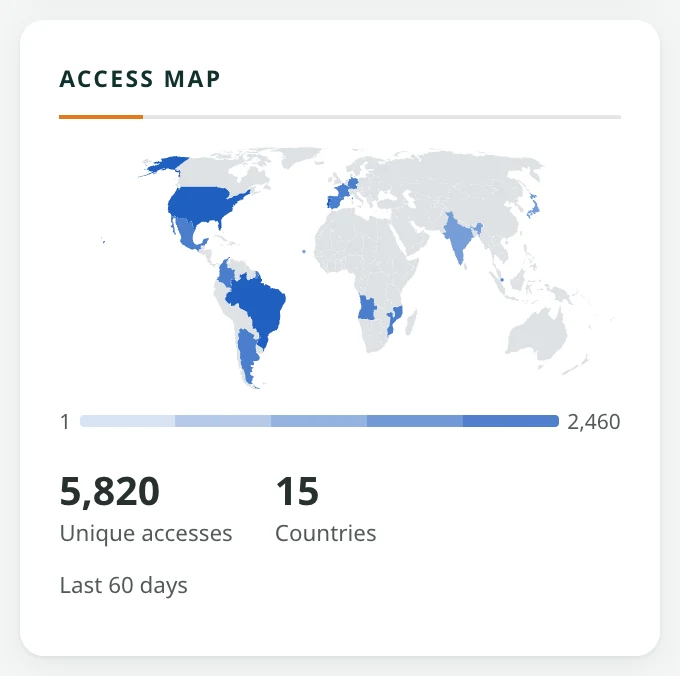
- a world map with one shade per country, on a logarithmic scale — a journal's accesses concentrate in a few countries, and on an ordinary scale the rest would look empty; countries too small for their outline show as a dot;
- the number of accesses and countries and the list of top countries, also as text, for screen readers and search engines;
- unique accesses (the same reader counted once per article and per day) or all accesses.
The period and the look belong to the journal
The map covers the last days the journal chooses, or everything since a date, or both — for example, the last 365 days but never before the journal's relaunch. Colors, the block title in each language and the length of the country list are configurable.
A filter against robots
Part of the accesses comes from robots posing as browsers, and OJS's robot list does not catch them all. The plugin's filter, on by default, removes those accesses from the map without touching OJS's official statistics. Countries that mostly send data-center traffic can be left out.
When the map is empty, the journal manager sees why; readers do not see an empty box.
For OJS and OMP
The same package works on OJS 3.5 and OMP 3.5, speaking of journals and articles on one and of presses and books on the other.
How to install
- Download the package from the releases page of the repository on GitHub.
- Under Settings › Website › Plugins › Upload a New Plugin, upload the
.tar.gzfile. - Enable the Visitor Map in the list of block plugins.
- Place the block in the sidebar, under Settings › Website › Appearance › Sidebar.
Geographic statistics must be on, under Administration › Site Settings › Statistics (country level is enough). Only accesses recorded while it is on have a country.