Article

Multilingual JATS Viewer: the full text of the article, in every language, inside the journal

OJSBR's new plugin for OJS 3.5 shows the JATS XML as a page of the journal itself, with a language selector following the SciELO model, and replaces the Lens Galley.

By Eder Sotto · OJSBR · Published on

Crossrefhttps://doi.org/10.52079/vha77-gjf06

Many journals already pay for the JATS XML of every article. It is the format SciELO requires, it is what indexers read best, and it is where the English or Spanish translation travels together with the original text. But in OJS that XML rarely reaches readers the way it should: the viewer that ships with the system, the Lens Galley, opens a separate screen, shows only the main language and builds the text in the browser. To solve this, OJSBR developed the Multilingual JATS Viewer, a free, open-source plugin for OJS 3.5.

Why full text in XML matters

PDF is still useful for printing and archiving, but it is a format designed for paper. On a phone, readers have to zoom and drag the page. For screen reader users, it depends on how the file was produced. And the references, the DOI and the ORCID iDs are locked inside the file.

Full text in HTML, built from the JATS XML, solves this. The page fits the screen, links work, tables remain tables, and the content is structured: title, authors, abstracts, sections and references, each in its place. JATS is the international standard for this (NISO Z39.96), used by PubMed Central and, under the rules of the SciELO Publishing Schema (SPS), by SciELO.

For the journal, publishing the full text inside its own page has a direct effect: readers stay on the journal's site, with its name, its menu and its visual identity, and not in a generic viewer.

The problem with the Lens Galley

OJS shows XML galleys with the Lens Galley plugin, based on eLife Lens, a JavaScript reader that has not been maintained since 2022. It covers the basics, but it has limits that weigh precisely on those who invest in XML:

  • Only the main language. The Lens shows only the main article of the XML. The translations in the same file never appear: the journal pays for XML in three languages and publishes one.
  • Outside the journal. The Lens page replaces the journal page. Readers lose the header, the menu and the sidebar, and land on a screen that looks like another site.
  • Text built in the browser. The content only appears after the JavaScript runs. Search engines get an empty page.
  • Hidden tables. Tables sit under a tab called Figures, mixed with the figures.

What the plugin does

With the Multilingual JATS Viewer, the XML galley opens as a page of the journal itself: the theme's header, menu, sidebar and footer, with its fonts and colors. The text is built on the server, so it reaches readers and search engines ready to read.
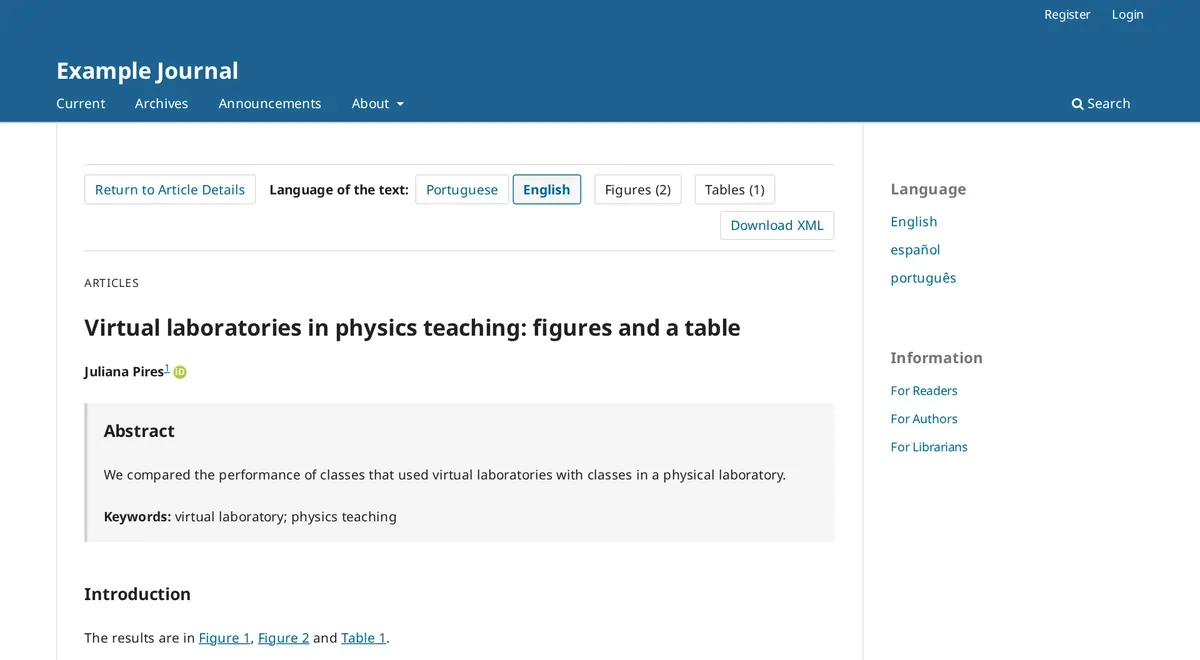
XML article opened by the Multilingual JATS Viewer inside the theme of a sample journal on OJS, with the Language of the text bar (Portuguese and English), the Figures, Tables and Download XML buttons, the title, the author and the abstract
The XML article inside the journal theme, with the language selector and the panels at the top of the text. A sample journal on OJS 3.5.

At the top of the text there is a bar with the language selector, the Figures and Tables panels and the button to download the XML. Each panel only appears when the article has items of that kind: an article with tables only shows no empty figures panel.

The plugin shows what a good JATS XML carries:

  • title, authors with affiliations and ORCID, and the authors' biographies;
  • abstracts, including structured ones and those in other languages, and keywords;
  • sections, lists, quotes, notes and MathML formulas, drawn by the browser itself;
  • tables and figures with captions, with the images taken from the galley's dependent files, as with the Lens;
  • references with links to the DOI, history, license and the article's DOI.

Multilingual, the SciELO way

In the SciELO Publishing Schema, the translation of an article is not a separate file. It goes in the same XML, as a sub-article of type translation. That is how SciELO publishes an article in Portuguese, English and Spanish from a single XML.

The plugin reads this model and turns the XML into a page with a selector: Português | English | Español. Readers switch languages with one click, without leaving the journal page.
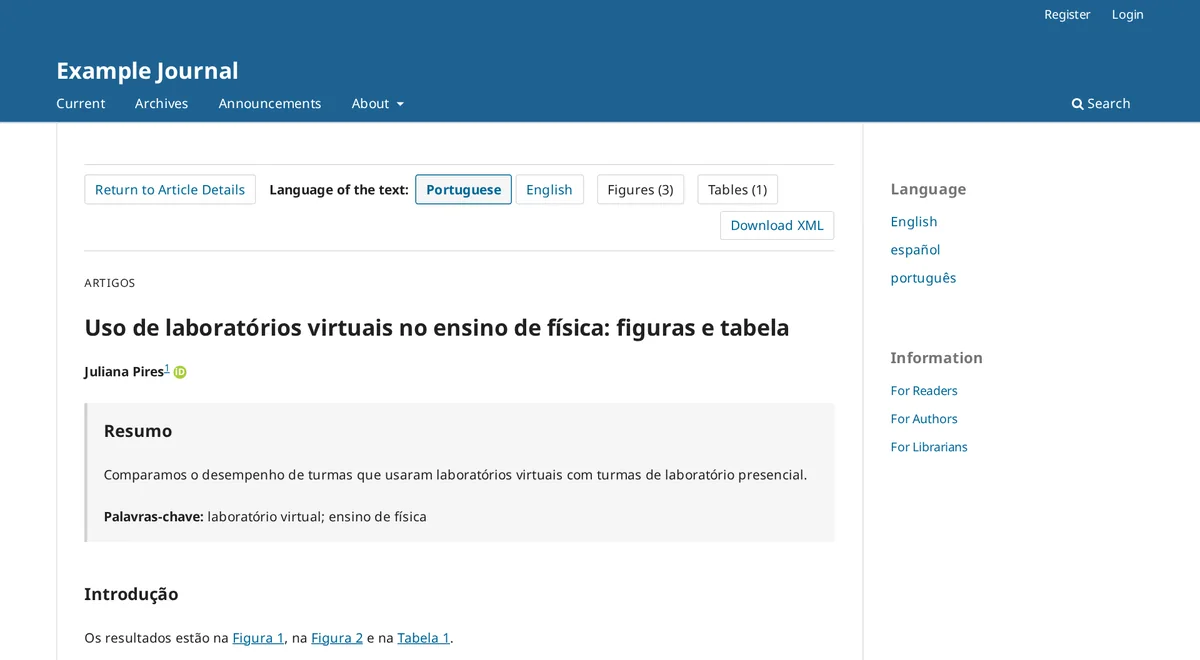
The same article with the text in Portuguese: the journal menu stays in English, but the text labels read Resumo and Palavras-chave
The same article, one click later. The site stays in English, but Resumo and Palavras-chave follow the language of the text.
  • The first language is the reader's. The first language shown is the site's interface language, when the XML has it. If not, it is the language of the main article.
  • Labels follow the text. Abstract, Keywords and References appear in the language of the text shown, not only in the language of the site. The plugin's interface speaks 38 languages.
  • Each language has its own address. The English version is at ?lang=en, the Spanish one at ?lang=es, and the versions point to each other for search engines. Each translation can be found and shared directly.
  • A translation without its own references shows those of the main article.

From desktop to phone

The layout is fluid and does not break the journal theme. A wide table scrolls inside its own frame, an image fits the column, and the page works even on a phone 375 pixels wide.
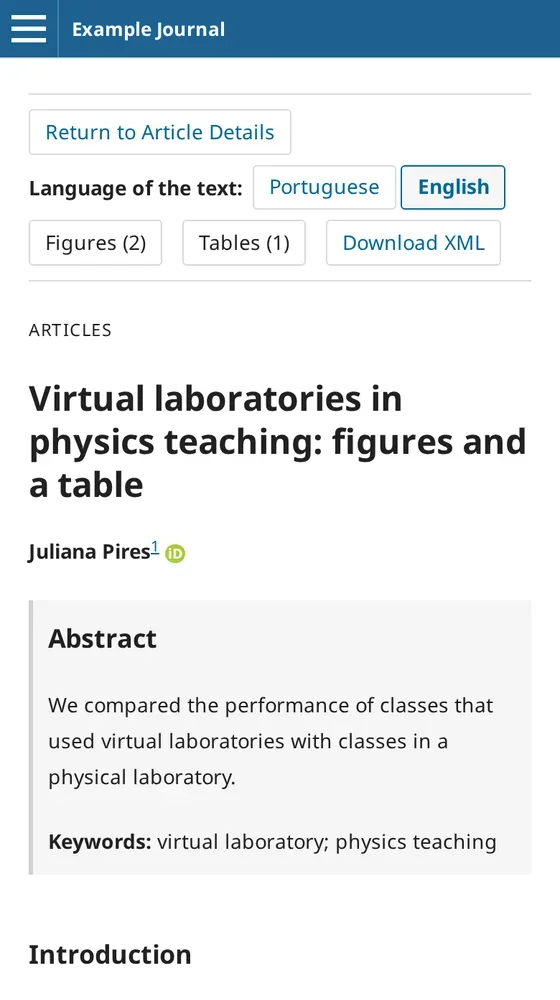
The same article on a phone, with the language selector, the Figures, Tables and Download XML buttons and the abstract filling the width of the screen
On a phone, the bar rearranges itself and the text fills the screen.

See it live

Revista Jurídica da Amazônia already uses the plugin. Open a trilingual article from the journal and switch between Portuguese, English and Spanish with the selector at the top of the text.

What else editors should know

  • It works alongside the Lens. While the plugin is enabled, the XML galleys of articles open with it. Disable it and the Lens is back, with nothing to undo.
  • The original XML is still available. The download button returns the XML file, as before.
  • Statistics keep counting. With the Lens, an access was counted when the browser downloaded the XML. With the plugin, each view of the page is counted the way OJS counts the download of the galley, and goes into the same reports.
  • A broken XML does not break the page. If the file is not valid XML or not a JATS article, readers see a notice with a link to download the file.
  • Security. The XML comes from third parties, so the plugin reads it without network access and without running anything that comes in the file. Only known elements and links reach the page.
  • Fast pages. The text of each language is built once and stored. A new file, a replaced image or a new version of the plugin builds the page again.

How to install

The plugin is for OJS 3.5 and needs PHP 8.2 or later, with the dom, xsl and intl extensions.

  1. Download the package from the releases page of the plugin repository on GitHub.
  2. In OJS, go to Settings › Website › Plugins › Upload a new plugin and upload the .tar.gz file.
  3. Enable Multilingual JATS Viewer in the list of generic plugins.

From then on, the XML galleys of articles open with the viewer. Images follow the usual OJS rule: they are uploaded as dependent files of the galley, with the name used in the XML (fig1.jpg, or just fig1).

If your journal is hosted by OJSBR, request the installation through our ticket system.

No JATS XML for your articles yet? OJSBR does JATS XML markup and conversion to the SciELO standard. For that, or to install and configure the plugin on your journal, talk to us.

Need help with OJS, OMP or DOI?

Managed hosting, specialized support and DOI registration with no annual fee.

Request a quote
Read next